
by Sarah Jan 23,2025
Call of Duty: Black Ops 6’s new Buffer Weight Stock attachment is making waves, boosting the power of several weapons. However, obtaining and using it isn't straightforward. This guide explains how to unlock and equip this sought-after attachment.
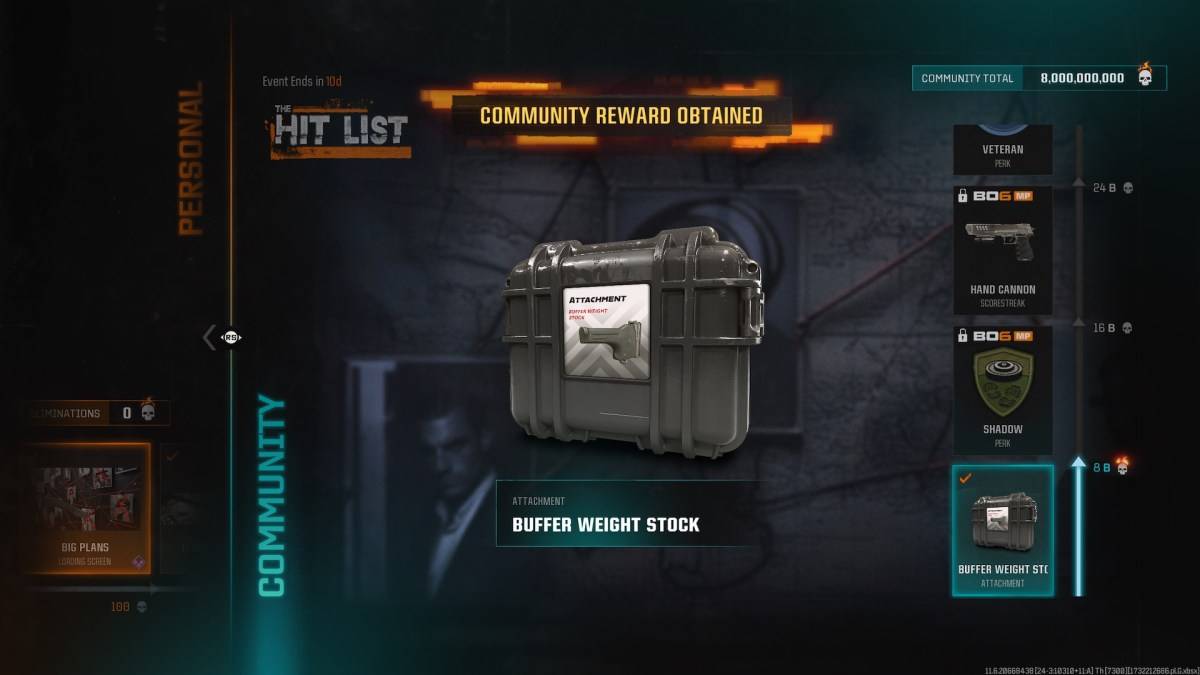 Unlike most attachments earned through gameplay progression, the Buffer Weight Stock is unlocked via the in-game "Hit List" event. Access the "Event" tab in the Black Ops 6 Multiplayer main menu. Locate the "Community" section; the Buffer Weight Stock will be listed there. Simply viewing this page unlocks the attachment (the community goal of eight billion eliminations has already been met).
While unlocking is easy, equipping the Buffer Weight Stock is more restrictive. It's compatible with only three weapons: the XM4 Assault Rifle, the DM-10 Marksman Rifle, and the XMG Light Machine Gun. This limitation prevents the attachment from dominating gameplay. The significant accuracy boost it provides, however, makes it highly desirable for those lucky enough to use it on a compatible weapon.
To equip the attachment, navigate to the Gunsmith for your chosen weapon. Select the "Stock" attachment slot and choose the Buffer Weight Stock. It's then ready to use in Multiplayer. Continue participating in the Hit List event to unlock further rewards.
That's all there is to unlocking and equipping the Buffer Weight Stock in Call of Duty: Black Ops 6.
Call of Duty: Black Ops 6 and Warzone are available now on PlayStation, Xbox, and PC.
Zenless Zone Zero Update Cycle Leak Hints at Future Content cadence
Counterfeit Bank Simulator: Minting Solution for Economic Crises
Marvel Rivals: Season 1 Dracula Explained
Roblox: Anime Auras RNG Codes (January 2025)
All Mavuika Materials, Kit, and Constellations in Genshin Impact
Albion Online launches Paths to Glory update with new content, boosted spawn rates, and more
Best Xbox Game Pass Games For Kids (January 2025)
Solo Leveling: Global Tournament Draws Near

Tycoon Game Truck Manager 2025 Debuts on Android
May 05,2026

Dave the Diver Jungle DLC Pre-orders Open
May 03,2026

KEMCO's Alphadia III Turn-Based RPG Launches on Android
May 02,2026

Death Stranding 2 Launch Date Revealed in Epic Trailer
May 02,2026

Carmen Sandiego FestiVILE Sparks Carnival Crisis
Apr 30,2026
 Category