by Ethan Mar 19,2025
Many games launch with optimization issues, later patched. *FragPunk*, however, has enjoyed smooth performance since release. While further frame rate improvements are always possible, here are the best settings and crosshair codes to maximize your *FragPunk* experience.

*FragPunk*'s settings are divided into five tabs. Beyond the Video tab, most settings are quality-of-life or accessibility options with minimal performance impact, though some enhance gameplay. We'll highlight those; others can remain at default or be adjusted to your preference.
The General tab offers mostly quality-of-life and personal preference adjustments. Experiment to find your ideal setup. These are recommended changes, but some preferences may vary:
Customize your keybinds here. A useful suggestion: since Automatic Sprint is on, rebind walking to Shift, mirroring the setup in many tactical shooters like *VALORANT* and *CS2*.
Personal preference reigns here. Experiment or use an online calculator to convert settings from games like *VALORANT* or *CS2*.
Adjust Sound Effects to a comfortable level. Lower Music, Announcer, and Button Volume. Enable Character Voice Simplification to remove unnecessary dialogue.
Voice Chat settings are a matter of personal preference.
Related: FragPunk Codes (March 2025)
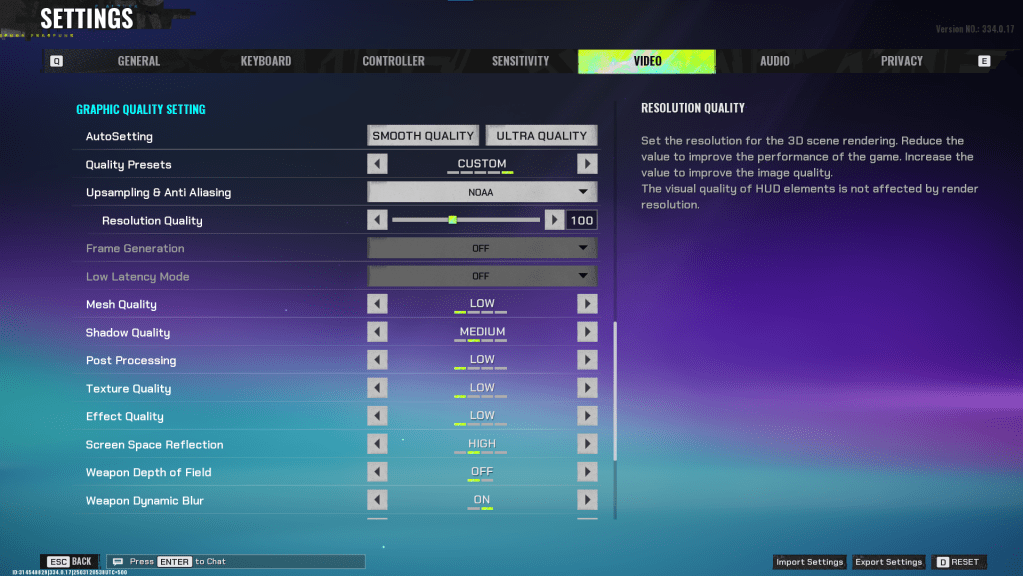
The Video tab is crucial for performance optimization. These settings prioritize frames per second, potentially sacrificing visual fidelity. In a competitive shooter, high frame rates are paramount. High-end PCs might tolerate higher quality, but these are generally the best settings for performance.
| Display Screen | Your Preferred Monitor |
| Display Mode | Fullscreen |
| Display Ratio | Monitor’s Default |
| Display Resolution | Monitor’s Native |
| FOV | 125 |
| Filter | Default or Personal Preference |
| Post Processing Intensity | None or Low |
| Menu Frame Rate Limit | 60 |
| Gameplay Framerate Limit | Monitor’s Refresh Rate |
| Out of Focus Framerate Limit | 60 |
| Brightness | 1 or adjust according to preference |
| Sharpen | Same as Brightness |
| Vertical Sync | Off |
| Antii-tearing | Off |
| Graphics API | Experiment with DX11 and 12 to see what works best with your system |
This unique option significantly reduces visual effects, yielding a 15-20 FPS gain (based on testing). The visual downgrade is noticeable, so consider this trade-off carefully. Use these settings with Minimalistic Graphics enabled:
| Material Complexity | Minimalistic |
| Light Complexity | Minimalistic |
| Scene Saturation | Minimalistic |
| Effects Complexity | Minimalistic |
| Dead Effect | Off |
| Damage Numbers | On |
| UI Info Simplification | On |
| UI Animation Simplification | Off |
| Quality Presets | Custom |
| Upscaling and Anti-Aliasing | Depending on your GPU, choose FSR 2 with Performance for AMD GPUs or NVIDIA Image Scaling with Performance for NVIDIA GPUs. You can also just set it to NOAA with 100% if you don’t want to use any upscaling. |
| Mesh Quality | Low |
| Shadow Quality | Medium |
| Post Processing | Low |
| Texture Quality | Low |
| Effect Quality | Low |
| Screen Space Reflections | High |
| Weapon Depth of Field | Off |
| Weapon Dynamic Blur | On |
| Scene Dynamic Blur | Off |
| Ray Tracing | Off |
| SSGi | On |
| UI Resolution | High. Doesn’t affect in-game FPS. |
| Animation Physical | Off |
A well-chosen crosshair significantly impacts gameplay. Here are some options to try:
Classic Plus
azazafzaezaezaezaezfczazaabzaafzazaaabzazaczaczaczaczfcbzbzaabzaafzazaaabzFFFFFFzFFFFFFClassic Dot
czazafzaezagzagzagzfczbzaabziedzazaaabzazaczaczaczaczfcbzbzaabzaafzazaaabzFFFFFFzFFFFFFPrecision Plus
azazafzaezaezaezaezabzazaabziedzazaaabzazaczaczaczaczfcbzbzaabzaafzazaaabzFFFFFFzFFFFFFClassic T Shaped
bzazafzaezaezaezaezabzbzaabziedzazaaabzazaczaczaczaczfcbzbzaabzaafzazaaabzFFFFFFzFFFFFThese are the best *FragPunk* settings and crosshair codes. *FragPunk* is available now on PC.
Zenless Zone Zero Update Cycle Leak Hints at Future Content cadence
Roblox: Anime Auras RNG Codes (January 2025)
All Mavuika Materials, Kit, and Constellations in Genshin Impact
Counterfeit Bank Simulator: Minting Solution for Economic Crises
Marvel Rivals: Season 1 Dracula Explained
Albion Online launches Paths to Glory update with new content, boosted spawn rates, and more
Best Xbox Game Pass Games For Kids (January 2025)
Solo Leveling: Global Tournament Draws Near
Kingdom Come: Deliverance Cast Members Announced for Final Curtain Call Performance
Apr 09,2026
Wuthering Waves 2.3 Update and Anniversary Events Launched
Apr 08,2026
Hearthstone Trinkets Return to Battlegrounds
Apr 05,2026
James Bond '007' Debuts With Lennie James Co-Starring
Apr 05,2026
MindsEye Fires 300; Ex-GTA Boss Benzies Addresses Staff
Apr 02,2026
 Category